Skype
Currently, I'm using Skype. Skype is an international calling service that is really cheap. Think of it like an instant messaging program (Like AOL's AIM or MSN Messanger) that's connected to the phone system. Using your PC speakers and a microphone or a headset (like mine below), you can sign up for free and call anyone else who also has a Skype account. Alternatively, you can pay about $2 a month for the ability to call regular phone numbers. You turn it into your full phone line by purchasing a real phone number (in any area code!) for only $24 a year.
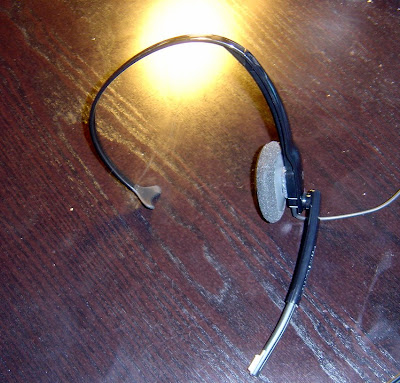
I like Skype. I love how cheap it is, and the flexibility it gives is great. There are "Skypecasts" which are basically radio shows you can call and listen in. There are chatrooms and other conference calling featuers.
The cons are that it relies on your internet connection. If your internet is down, you can't answer the phone. Sure, you can have calls forwarded to a different number, but then you're required to have a different number anyway.
One last pro is the software involved. I've downloaded an add on program called "PowerGramo" which records every call I make. I can save the calls as an MP3 file, or use any of the archiving features.
The biggest reason that Skype hasn't replaced my phone service is that it doesn't include emergency services. Thus, you can't call 911 from Skype. That's a serious problem.
For now, I'll use it for cheap calling out. Besides, when I want a new phone number, I'll probably use ...
Grand Central

Grand Central isn't yet available. The company was purchased by Google and is currently still being tested. When testing is over, it makes a fabulous promise:
One phone number for the rest of your life.
Here's how it works: You obtain (for free) a phone number from Grand Central. Then, by accessing the internet, you can specify where that one number should be sent. You can have it forward calls to your cell phone, your home phone, or your office. You can even do this depending on what time it is! You can have it forward your calls to all your phones at once. So when you've got a new cell phone number or new office number, no one has to know.
Grand Central offers a ton of features: You can pick what area code your number is in, you can record all your calls, it handles voicemail, it can play custom ring tones depending on who is calling, ... You've really gotta check out the website to read them all.
As for the cons, I really don't know. Perhaps Google will be embedding advertisements somewhere. It's hard to say until the service is actually available to the public.
As far as me, I will be signing up when this goes live. Until then, I can only dream.
Apple's iPhone
Some of you might have wondered why I haven't jumped on the iPhone bandwagon. Well, mostly price. I can honestly say that it is pretty awesome from all the reports I've heard. I was able to play with Nick Massahos' phone, and it seemed great. Especially now that Apple has released the ability to add applications, there seems like nothing it can't do.
But to get the iPhone, you've gotta pay $200 up front and about $80-100 a year for two years. Total price: $2120. I can't afford that. Checking the internet and my email isn't worth paying that much. I'm on the internet too much as it is.
One thing I would be interested in is the iPod Touch. Lifehacker (a personal productivity blog) recently had an article about why the iPod Touch does almost everything the iPhone does without having to pay $80 a month (link):
"Back in June 2007, I couldn't convince my wife that checking my email in grocery lines was worth $1,320—the cost of an original iPhone and one year of the cheapest plan. These days, the trend-setting phone costs even more money over its life, and it's more than a little restrictive and even a bit buggy. So I'm amazed at how little love the iPod touch gets. It's a slimmer iPhone with almost all its features, it requires no contract, and when you can't get a Wi-Fi signal, your plain, humble cellphone can step up to take its place."Pretty convincing if you ask me. Besides, I'm waiting with baited breath for ...
Google Android

It isn't a Google phone, but a Google Operating System for Cell Phones. Android is for cell phones as Windows is for Computers. It's the basic software that runs your phone.
The big difference is that it is open. Anyone (even me!) can make an application for the phone. This is compared to the current phone situation, where you have to pay $5 to download a ring tone, and upwards of $15 if you want a game.
If you haven't caught on by now, I'm a big Google fan. While other people were waiting in line to buy an iPhone, I'll be waiting in line to buy a phone with Google Android.
The real advantage for Google is that any phone maker can include Android. So I'm hoping I can stay with T-Mobile. The iPhone, on the other hand, requires AT&T.
The last estimate was that Android would start appearing on cell phones in Fall 2008. I'll be waiting. (I basically canceled my contract with T-Mobile so that I could get Google Android).




 Posts
Posts


